Introduction
7 min read · Last updated: May 2026
Those days are gone when you have to manually calculate your finances and rely on banks to know your savings. Today we are ahead in technology in almost every sector including e-commerce, healthcare, education, and managing finances. Today we have resourceful budgeting apps like Mint to help us create a budget, and track income and spending. Before starting our list of budgeting apps, let’s first understand what exactly these budget apps do to provide easy financial solutions.
What Are Budgeting Apps?
A budget app is a software program that helps you track your income and spending.
Most budgeting apps connect to all of your bank accounts and then automatically import and organize your transactions. A good budgeting app should be simple to use and provide a clear picture of how much money you have available for spending each month. There are several budget applications available, so try a few until you discover the one that works best for you. Related: eCommerce app development.
One of the best examples of a budgeting app was Mint. It was made by Intuit in 2009, and it was a free personal finance app. It has long been one of the most popular and well-rated budget apps. Mint connects to practically all forms of users’ financial accounts, including credit cards, investments, and loans. It has some great features like review spending, net worth tracking, providing personalized goals and budgeting categories.
Although Mint was a popular app, it’s no more with us. Users had lost access to their Mint accounts on March 23, 2026. While some Mint features (such as spending and net worth tracking) will be carried over to the Credit Karma app, monthly budgeting, and customized categories will be excluded. It is uncertain whether these features will finally be moved over. With this, it has become crucial for Mint app lovers to find some of the stable budgeting apps like Mint.
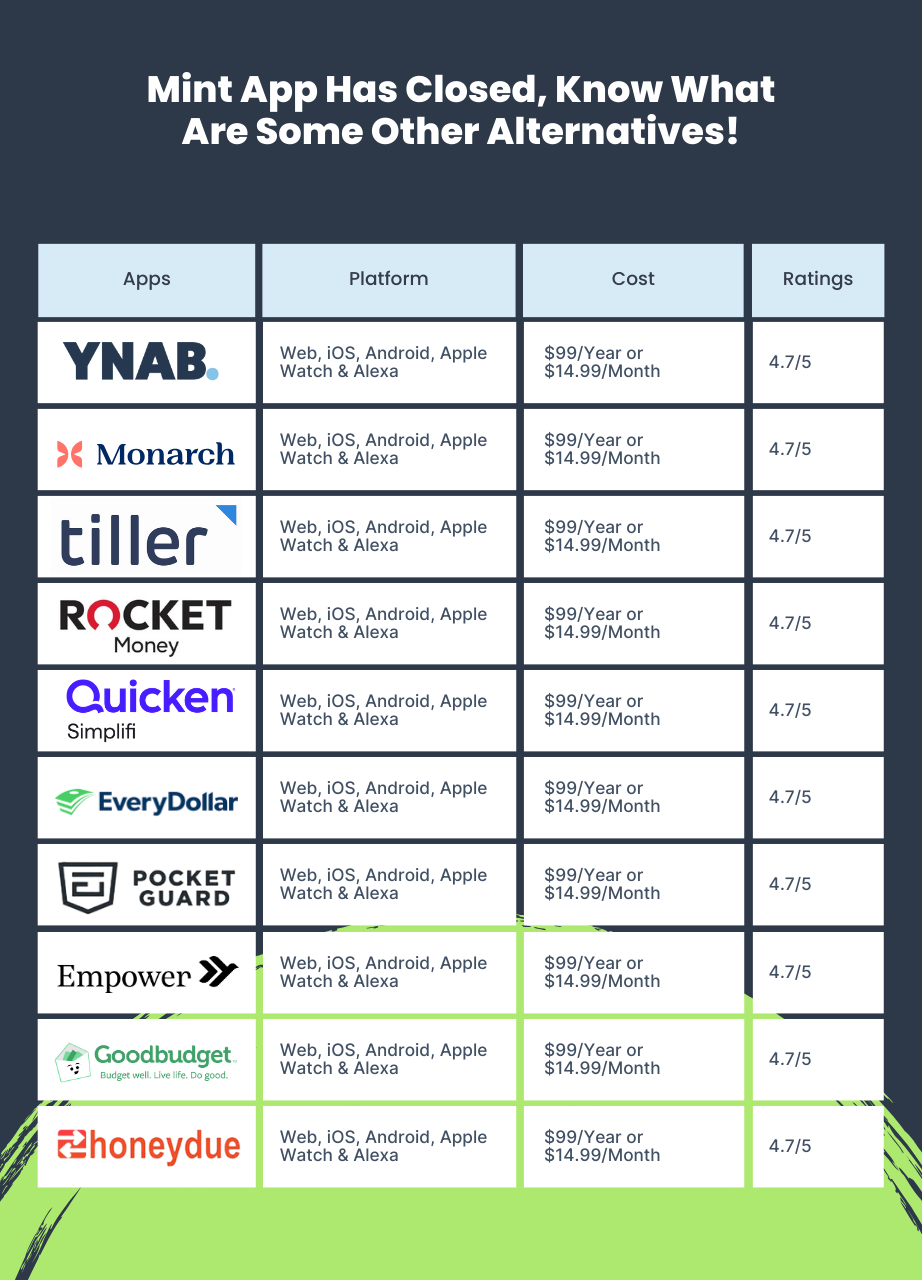
1) YNAB
YNAB (You Need a Budget) is one of the popular budgeting apps like Mint with a unique approach. Instead of tracking your spending after the fact, YNAB employs a zero-based budgeting system in which you allocate each dollar of your income to a specified area, such as rent, food, or savings. This encourages you to be more intentional with your money and helps avoid overpaying.
YNAB lets you establish precise savings objectives, like a down payment on a house or a new automobile. It can help you keep track of your debt and devise a repayment strategy. YNAB provides a mobile app that tracks your budget and expenditures while on the road and offers several resorts that can help you track your progress and identify areas where you can improve your spending habits.
Pros
- Free trial
- Help you reach financial goals
- Help those struggling with overspending
Cons
- Requires a paid subscription
- Steeper learning curve
- Lacks features like bill pay or investment tracking
2) Monarch Money
Monarch Money is another best budgeting apps like Mint that charges one of the highest fees for using their budgeting program. But you’ll have infinite budgeting, financial connections, and partners. This makes it an excellent choice for families that track expenses together or if you want to include your financial team to view your spending and other accounts.
Monarch Money shines at letting partners view your account, which Mint does not offer. So if you’re budgeting alone, this won’t matter much. However, it has some of the same key functions, such as syncing your net worth, showing your transactions, generating budgets and savings goals, and more. However, Monarch Money does not provide a credit score or report, which many people value as an added benefit. Related: mobile app development.
Pros
- Modern and user-friendly interface
- Zero-based budgeting
- Financial literacy resources
Cons
- Limited free features
- Requires paid membership after trial
- Lacks some advanced features
3) Tiller Money
Tiller Money is more of a Google Sheets plug-in than a standalone financial tracking software, but it offers excellent compatibility for spreadsheet enthusiasts wishing to tailor their budgets.
Tiller integrates with Google Sheets and allows you to use custom templates to manage spreadsheets containing account information and spending. Tiller also automatically refreshes financial data and sends forth daily reports of account activities. Tiller Money is not a full investment tool; instead, it is designed to track costs, improve your budgeting process, and make mobile spreadsheets easier to use and understand.
It is best suited for contractors and business owners who need to manage a large number of clients and expenses. Those with less intricate financial conditions will most likely benefit from budgeting apps that offer more in-depth services and tools.
Pros
- Powerful budgeting tools
- Customizable
- Affordable
Cons
- Requires Google Sheets
- Can be complex
- No mobile app
4) Rocket Money
Rocket Money, originally Truebill, began as a platform where you could cancel old or undesired subscriptions that were eating up your revenue. While it is still a function, Rocket Money also allows you to link your accounts to create a tailored budget and track all of your expenses. You may set spending and savings objectives, as well as monitor your credit score and report, exactly as with Mint.
The majority of the value stems from its ability to help you cancel undesired subscriptions, but Rocket Money retains a share of the savings as profit. (It doesn’t cost anything unless it lowers your bill.) This is wonderful if you have a lot of unnecessary subscriptions, but Rocket Money lacks the specificity. Related: cross-platform app development.
Pros
- Freemium model
- Subscription management
- Bill negotiation
Cons
- Limited free features
- Lacks investment tracking
- Bill's negotiation success rate may vary
5) Quicken Simplifiy
Quicken Simplifi is one of our next amazing budgeting apps like Mint. Developed by the founders of Quicken, a prominent personal financial software package. Simplifi provides a free trial but thereafter requires a paid subscription. It connects to your bank accounts, credit cards, loans, and investments to automatically input transactions. This eliminates the need for manual data entry, saving time while maintaining accuracy.
Pros
- User-friendly interface
- Automatic transaction
- Set and track saving goals
Cons
- Requires paid subscription
- Lacks features like investment tracking or zero-based budgeting
- Not customizable
6) EveryDollar
EveryDollar application provides a zero-based budgeting structure that is simpler (and possibly more manageable) than Mint. You can start with the simple free edition of EveryDollar, in which you do not need to sync accounts. But instead, manually enter incoming and exiting funds throughout the month. You also categorize line items in your budget and schedule bill payments.
EveryDollar’s premium, paid edition contains all of these capabilities as well as the ability to connect to your bank account. Your transactions are automatically shown in the app, which also generates bespoke reports and recommendations depending on your habits. You can also link your savings and investment accounts.
Pros
- Free to use
- Zero-based budgeting focus
- Easy to use
Cons
- Limited features in the free version
- Limited customization
7) PocketGuard
PocketGuard’s is another alternative to apps like Mint. Its feature set isn’t the most comprehensive on our list, but that’s part of why we enjoy it. The app focuses on simplicity. You may connect your bank accounts, credit cards, loans, and investments, as well as track invoices. With that information, the program calculates how much money you have left to spend after allocating funds for essentials, bills, and ambitions.
PocketGuard also tracks your net worth and gives you the option of not linking your accounts and manually tracking your finances. The commercial version, PocketGuard Plus, includes a debt payoff plan, the ability to export transactions, and other features. Related: hire cross-platform developers.
Pros
- Focus on spendable cash
- Bill negotiation assistant
- Subscription management
Cons
- Limited free features
- Lacks investment tracking
8) Empower
Empower Personal Dashboard, formerly Personal Capital, is primarily an investment platform, but its free app contains features that help budgeters track their expenditure. You may link and track checking, savings, and credit card accounts, as well as IRAs, 401(k), mortgages, and loans.
The app provides a spending snapshot by displaying recent transactions by category. You can customize those categories and view the total monthly spending for each one.
Empower also provides a net worth and portfolio tracker. The app is accessible on both mobile and desktop devices.
Pros
- Provides context for overall finances
- Check monthly spending and total net worth
- Track retirement savings progress
Cons
- Limited functionality
- Focus on Retirement
9) Good Budget
Goodbudget focuses on financial planning rather than transaction tracking. This program is based on the envelope budgeting technique, in which you allocate your monthly income to specified expenditure categories. This app does not connect to your financial accounts. You manually enter account balances (which you can obtain from your bank’s website), cash amounts, debts, and income. Then you assign money to envelopes.
You can use the app on your phone or the web. You’ll also discover numerous articles and videos to help you use the app. Goodbudget provides a free version that allows for one account, two devices, and a restricted number of envelopes. Its paid version, Goodbudget Plus, has limitless envelopes and accounts, up to five devices, and other benefits.
Pros
- Easy to use
- Free and paid plans
- Sharing capability
Cons
- Limited automation
- Lacks automatic transaction import
- Limited bill pay features
10) Honeydue
Honeydue is a unique alternative to apps like Mint meant to allow you and your partner to access both of your financial images in one app. Both couples can connect their bank accounts, credit cards, loans, and investments. (However, you can decide how much you reveal with your significant partner.) Related: custom software development.
The free budget tool automatically categorizes costs, but you may also create your categories. Honeydue will warn you when you or your partner approach the monthly restrictions you set for each of these areas. Honeydue also provides bill reminders and allows you to chat, and exchange emoticons.
Pros
- Shared financial view
- Automatic transaction categorization
- Easy-to-use interface
Cons
- Limited features as compared to other budgeting apps
- Relies on account linking
- Focus on shared finances
Conclusion
In concluding today’s discussion on “Best Budgeting Apps Like Mint,” it’s crucial to select a budgeting app from Echoinnovate IT that simplifies and streamlines your financial management. When making your choice, assess the app’s unique features, match them with your budgeting requirements, compare various options, ensure transparent security features, and confirm the dashboard’s user-friendliness. Take control of your finances effortlessly with the right budgeting app!
→ Best Custom App Development Company
Frequently Asked Questions
Why did Mint shut down?
Intuit shut down Mint in March 2024 after years of low monetization despite ~25 million users. Mint relied heavily on credit-card affiliate revenue, which became insufficient to fund continued investment as competitor budgeting apps adopted subscription models. Intuit’s Credit Karma offered overlapping features. Existing Mint users were prompted to migrate to Credit Karma; many switched to dedicated alternatives like Monarch, YNAB, or Copilot.
What's the best Mint alternative in 2026?
The most popular Mint replacements in 2026: Monarch Money ($14.99/month — Mint refugees overwhelmingly migrated here for similar UX). YNAB ($14.99/month — strongest envelope-budgeting community). Copilot Money (iOS-only, $13/month — modern UI). Empower (free — strong for net-worth tracking, lighter on budgeting). Rocket Money ($4-12/month — best for subscription tracking + bill negotiation).
Are budgeting apps worth paying for?
For users who actively budget: yes. The math: $10-15/month subscription typically saves $50-200/month in identified spending leaks (subscription audits, fee tracking, smarter spending decisions). For users who track passively without changing behavior: free apps like Empower deliver similar value. The conversion rate from free to paid is typically 8-15% — most users find paying worthwhile if they actually use the app.
Can budgeting apps connect to all my bank accounts?
Most budgeting apps in 2026 use Plaid or MX (bank-aggregation services) supporting 10,000+ US banks and credit unions. Coverage gaps are rare. The biggest issue is connection stability — bank-aggregation connections occasionally break and require re-authentication. Apps using Plaid (most modern apps do) generally have the best stability and coverage.
Are budgeting apps secure?
The major apps (Monarch, YNAB, Copilot, Empower) use bank-grade 256-bit encryption, read-only bank connections (no transfer authority), and multi-factor authentication. They don’t store your bank passwords — Plaid/MX handle authentication via OAuth tokens. The biggest user-side risk is phishing — never click links from emails purporting to be from your budgeting app; always log in directly.
Build Your eCommerce Platform
Want to launch an Amazon/Temu/Shopify-style commerce app? We deliver mobile-first storefronts with payment gateways, inventory, and personalization.
