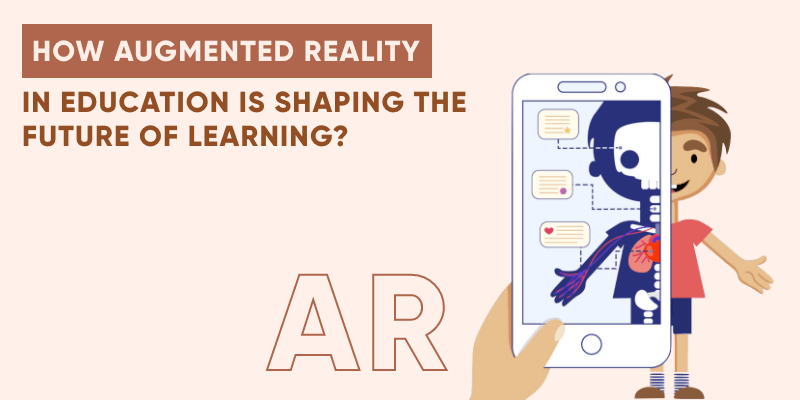
Augmented reality (AR) puts digital objects on top of the real world. A student points a phone or tablet at a page or a desk, and a 3D model appears. They can turn it, zoom in and take it apart.
In short: AR turns hard, abstract topics into things students can see and touch. This guide covers how it works in class, its main benefits, real apps schools use, the challenges, and what it takes to build an AR learning app.
8 min read
What is the role of augmented reality in education?
AR adds a digital layer to what students already see. Virtual reality (VR) is different. It replaces the real world with a fully simulated one and needs a headset.
That difference matters in school. With AR, the teacher, the class and the room stay in view. Students can still talk, point and work together.
The biggest win is with complex ideas. A flat diagram of the heart or a molecule asks students to imagine depth. A 3D model shows it, so students can walk around it and see how the parts connect.
Subjects where AR helps most
- Science: cells, organs, the solar system and chemical reactions
- Math: shapes, volume and graphs you can view from any side
- History: old objects, maps and buildings rebuilt in 3D
- Reading and languages: picture cards that speak or move
- Design and coding: students build and program their own 3D scenes
How AR is changing the classroom
Keeping a class focused on a new idea every day is hard. AR helps because students do something instead of just reading. They scan, move, build and test.
Universities use it too. Medical, nursing and engineering schools use AR and mixed reality to practise skills before students touch real patients or real machines.
Phones and tablets already support AR through Apple’s ARKit and Google’s ARCore. So most schools can start with devices they own, then add headsets later for a few lessons.
In practice, AR changes three things in a lesson:
- Students grasp hard ideas faster with live 3D examples.
- They stay on task longer than with flat pictures and text.
- They practise problem-solving by testing ideas and seeing the result right away.
Benefits of AR in education
Here are the benefits teachers and learning teams mention most often.
AR also works outside the classroom. An AR lesson can run on a family phone, so a student can explore a model at home. That makes it a good fit for remote and hybrid courses built as mobile apps.
Higher student engagement
Students pay attention when they can interact. A 3D model that reacts to their touch holds focus far better than a page of text.
AR applications can also add quizzes, sounds and short tasks to each model. Over time, they can sit next to printed posters and textbooks, or replace some of them.
Better learning content
AR helps teachers and publishers make richer content. 3D tools turn a flat lesson into something students can explore.
Take AR technology in apps like Quiver. Children colour a printed page, and the app turns their drawing into a moving 3D model. New content arrives in the app, so lessons stay fresh without reprinting.
Also Read:
Hard topics become simple
AR makes complex ideas easy to picture. Students see a full 3D model just by opening their phone’s camera.
This helps both sides. Teachers spend less time explaining depth and scale. Students spend more time asking good questions.
For example, CoSpaces Edu lets students build 3D scenes, animate them with block-based code and view them in AR. With a Merge Cube, they can even hold their creation in their hand.
No special equipment needed
VR needs a headset for each student. Most AR lessons only need a phone or tablet the school already has.
That keeps costs and setup time low. A school can test AR in one class, see what works, and then scale it up. Headsets such as Apple Vision Pro or Meta Quest can come later for special lessons.
Examples of AR apps for education
Here are three AR tools that schools use today, and what each one is good for.
| AR app | What it does | Best for |
|---|---|---|
|
Quiver
|
Turns coloured printed pages into moving 3D models
|
Young learners, science and art
|
|
CoSpaces Edu
|
Students build 3D scenes, code them with blocks and view them in AR or VR
|
Coding, design and project work
|
|
Merge EDU + Merge Cube
|
A foam cube becomes a 3D object students can hold, like a planet or a heart
|
Hands-on science and STEM lessons
|
Quiver. Children colour a page, then point the app at it. Their drawing pops up as a 3D figure they can watch and play with. A school version adds packs for science, maths and more.
CoSpaces Edu. Students design, code and explore their own creations in AR and VR, and teachers can review the work in one place. Building something similar for many devices? See our cross-platform app development services.
Also Read:
Merge EDU. The Merge Cube is a foam cube printed with a pattern. In the Merge apps, it turns into an object students can hold and rotate, like a fossil, a planet or the human heart.
Challenges to plan for
AR is useful, but it is not plug-and-play. Plan for these points before you roll it out.
Many lessons only run well on newer phones and tablets. Check which devices students really have. If you need an app for both iOS and Android, you can hire cross-platform developers.
- Device access: not every student owns a recent phone, so plan shared class sets.
- Content: good 3D models take time to make and must match the curriculum.
- Teacher training: teachers need short, practical training, not a manual.
- Privacy: camera apps for children must follow rules such as COPPA in the US and GDPR in Europe.
- Screen time: use AR for the parts of a lesson that need it, not the whole class.
Start small. Pick one subject where students struggle, then build or choose one AR lesson and measure the results. If students learn faster or stay more engaged, expand from there.
The same ideas work in tutor app development. A tutor can place a 3D model in a live session, so a student at home sees the same object and can ask about it.
AR in healthcare and medical education
Medicine is one of the strongest uses for AR. Mistakes are costly, so students need lots of safe practice first.
AR, VR and mixed reality let medical students study anatomy and rehearse procedures before they treat patients. Hospitals also use them for on-the-job training. Teams building these tools often need healthcare app development or custom software development.
Students can explore the heart, lungs or brain layer by layer. That helps with topics like the heart and blood vessels or the paths of nerves in the brain, which are hard to learn from flat images.
Building an AR learning app? How EchoInnovate IT helps
We build AR learning apps for schools, EdTech startups and training teams. That can mean 3D lessons on phones and tablets, AR flashcards, virtual labs, or AR added to an existing course app. We handle the 3D content flow, ARKit and ARCore, teacher dashboards and progress tracking.
The first step is a short scoping call. We look at your learners, devices and curriculum, then give you a fixed quote. See our education app development and mobile app development services.
Conclusion
AR makes learning more visual, more hands-on and easier to remember. It works on devices schools already own, and it shines in subjects where students struggle to picture what they read.
The best results come from starting small. Choose one hard topic, test one AR lesson, and grow from there.
Frequently Asked Questions
What are the benefits of AR in a classroom?
AR turns hard topics into 3D models that students can see, move and explore. That raises attention and helps them understand faster. Lessons also become more active, because students scan, build and test instead of just reading. Most AR lessons run on phones or tablets the school already owns.
How is AR used for job training?
AR lets trainees practise tasks in a safe setting before they do them for real. Medical students rehearse procedures, technicians follow step-by-step guides shown over real machines, and new staff learn equipment without the risk of damage. This keeps people engaged and safe, and it can cut training costs.
Why is augmented reality growing in education?
Students remember visual, hands-on material better than text alone, and AR delivers that on everyday devices. Apple’s ARKit and Google’s ARCore made AR possible on most modern phones and tablets. So teachers can add 3D models, virtual labs and interactive lessons without buying special hardware.
What is the difference between AR and VR in education?
AR adds digital objects to the real room, so students still see their teacher and classmates. VR replaces the room with a fully simulated world and needs a headset. AR suits everyday lessons on phones and tablets. VR suits deep, focused experiences such as virtual field trips.
How do I build an AR education app?
Start with one clear learning goal and one subject. Then choose your platforms, such as iOS, Android or both, and plan the 3D content. A development partner can build the app, the teacher tools and progress tracking. We start with a short scoping call and then give you a fixed quote.
Build the e-learning platform parents actually trust.
Live classes, recorded courses, AR lessons, progress tracking, parent dashboards and multi-language support. We’ve shipped 500+ products in 12 years with a team of 50+ people. Bring us your curriculum and audience, and we’ll scope the platform with you, then give you a fixed quote.