Developing an Android app in 2026 depends on how many features you need, how custom the design is, and how much backend and integration work sits behind the screens. A simple single-purpose app sits at the entry level, while a feature-rich product with accounts, payments, and third-party integrations reaches the higher tiers. Timeline follows the same curve: roughly 8 to 14 weeks for an MVP and 4 to 9 months for a full build.
This step-by-step guide is written for the person approving the budget, not only the engineer writing the code. You will get a clear cost breakdown by app type, the core steps to develop an Android app from idea to Play Store, the must-have features and tech stack, an honest view of what drives the price, and how a dedicated partner like EchoInnovate IT plans, builds, and maintains Android apps. For the numbers in more depth, our mobile app development cost guide pairs well with this article.
Key takeaways
- An Android app typically takes 8 weeks to 9 months to build, with cost driven by scope, not by the language you choose.
- Kotlin is the default language for native Android in 2026; cross-platform tools like Flutter and React Native let one team ship Android and iOS together.
- Launch an MVP that proves one core workflow first, then expand based on real Play Store usage.
- The biggest cost drivers are custom UI, accounts and permissions, payments, integrations, and device or hardware features.
- We do not publish fixed prices because scope decides everything; we give a transparent quote after a short scoping call.
In this article
How much does it cost to develop an Android app?
Cost depends on scope, so the useful way to budget is by app type. The ranges below reflect 2026 market rates for custom Android app development across agencies and dedicated offshore teams. They assume a professionally designed, tested, and Play Store–published app — not a template or no-code build. Use them to size your thinking, then confirm the real figure with a scoping call, because one complex feature can move a project up a tier.
| Android app type | Investment level | Typical timeline |
|---|---|---|
| Simple / single-purpose app | Entry-level | 8–14 weeks |
| Mid-level app (accounts, API, payments) | Mid-range | 3–6 months |
| Complex app (marketplace, on-demand, real-time) | Premium | 5–8 months |
| Enterprise / data-heavy platform | Enterprise-scale | 6–9 months+ |
Two things move you within or between tiers. The first is how much of the interface is custom versus assembled from standard Material components. The second is the invisible work behind the screens — accounts and permissions, payments, reporting, and integrations rarely show up in a demo but consume a large share of the budget. We do not publish a fixed price for your project because those variables are specific to you; we provide a transparent quote after a short scoping call. For hourly context, see our breakdown of hourly hiring charges for Android and iOS developers.
The steps to develop an Android app
Developing an Android app from idea to Play Store follows a predictable path. Doing the early steps properly is what keeps a project on budget, because most overruns come from unclear requirements rather than difficult code.
1. Define the idea and one core workflow. Write down who the user is, the single job the app does for them, and how you will measure success. The best Android apps launch by doing one thing well. This step sets your scope and, with it, your budget.
2. Validate and scope. Turn the idea into a prioritized feature list split into “launch” and “later.” A short discovery phase — user flows, a clickable wireframe, and a technical plan — removes the biggest source of overspend, which is rework.
3. Design for Android. Wireframes become high-fidelity screens that follow Material Design conventions so the app feels native to the platform. A small design system keeps build time down because engineers assemble from a consistent kit.
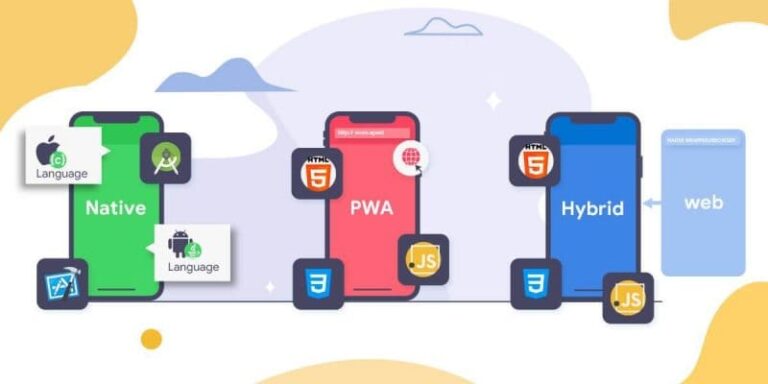
4. Choose native or cross-platform. Decide between native Kotlin (best for heavy device integration and maximum performance) and cross-platform Flutter or React Native (one codebase for Android and iOS). This single decision shapes cost, timeline, and your future iOS plans. Our guide to native vs hybrid vs web apps covers the trade-offs.
5. Build the back end and APIs. Data models, authentication, business logic, and the API come first, because the app depends on them. Push notifications, accounts, and payment logic are wired in here.
6. Build the Android front end. Engineers turn designs into screens that consume the API, handling different device sizes, Android versions, and permissions. Building against a real back end keeps everything in sync.
7. Test across devices, then release. Functional, performance, and security testing run continuously, across a range of real devices and Android versions. The app is then prepared for the Play Store, including store listing, privacy policy, and review requirements.
8. Launch, measure, and iterate. Release to the Play Store, watch real behavior and crash reports, and use that evidence to decide the next release. Post-launch maintenance — OS updates, bug fixes, and improvements — is an ongoing part of any serious app.
Must-have features of an Android app
Whatever your app does, a core set of features appears in almost every serious Android build. Budgeting for them upfront avoids surprise costs later.
Secure authentication and accounts. Sign-up, login, password reset, and often Google or social sign-in. If different users see different things, you also need roles and permissions — one of the most underestimated cost lines in any app.
A clean, Material-native interface. The app should follow Android conventions and adapt across phones, tablets, and foldables. A UI that feels native earns better reviews and higher retention.
Push notifications. Timely, relevant notifications are one of the strongest retention tools on Android. They require back-end setup and careful use so they help rather than annoy.
Offline support and sync. Mobile users lose connectivity, so caching data and syncing when the connection returns is often essential. Our overview of offline mobile app architectures explains the common patterns.
Payments and in-app purchases, where relevant. Subscriptions, one-off payments, or Google Play billing. This means integrating a payment provider and handling edge cases like failed charges and refunds.
Device and hardware features. Camera, GPS, biometrics, Bluetooth, and sensors expand what the app can do but add build and testing time, especially across the wide range of Android hardware.
Analytics, crash reporting, and security. You need to see how people use the app, catch crashes fast, and protect user data with encryption and sensible permissions. These turn a launched app into a product you can actually run and improve.
Tech stack and integrations
You do not need an exotic stack to build a strong Android app. Most products in 2026 run on a mainstream, well-supported set of tools, which also protects you on hiring and long-term maintenance. A typical stack looks like this:
- Native Android: Kotlin with Jetpack Compose is the default for native development in 2026. Kotlin is Google’s preferred language and has effectively replaced Java for new Android work — see our take on Kotlin as the future of Android.
- Cross-platform: Flutter (Dart) or React Native (JavaScript/TypeScript) let one team ship Android and iOS from a single codebase, which lowers cost when you need both platforms.
- Back end: Node.js, Laravel, Django, or .NET to power the API and business logic, with Firebase often used for authentication, push, and real-time data on smaller apps.
- Database and hosting: PostgreSQL, MySQL, or MongoDB on a managed cloud platform such as AWS or Google Cloud, with monitoring and automated backups.
Integrations are where projects quietly gain scope. Payment providers, maps, messaging (Twilio), analytics, CRMs, and internal systems all need connecting and testing, and each one adds time. List every integration you know about during scoping so it is priced in rather than discovered mid-build. If you will also need an iOS version, choosing cross-platform now can roughly halve the cost of covering both stores — our mobile app development team helps make that call. When your own team is missing a specific skill, IT staff augmentation can add it without a permanent hire.
How long does it take to build an Android app?
Timeline tracks scope closely. A focused MVP that proves one workflow usually takes 8 to 14 weeks from kickoff to a live Play Store listing. A mid-level app with accounts, payments, and integrations more often runs 3 to 6 months, and a complex or enterprise platform can take 6 to 9 months or more.
Those numbers assume a dedicated team working in parallel: while designers finalize later screens, engineers build the back end, and testing across devices runs alongside development rather than at the end. On Android specifically, device and OS-version fragmentation adds testing time you should budget for — the app has to behave well across a wide range of screen sizes and Android versions.
The single biggest cause of delay is not coding speed; it is unclear requirements and slow feedback. Projects where the client decides quickly and the scope is written down move noticeably faster. The most reliable way to compress the timeline without cutting corners is to launch an MVP first, then ship improvements every few weeks based on real Play Store usage. You reach users sooner and spread the investment over time — the same approach behind our MVP for startups engagements.
What drives the cost up or down
If two quotes for “an Android app” come back tens of thousands of dollars apart, it is almost always because of the factors below. Knowing them lets you steer the budget deliberately.
Feature count and complexity. Every feature adds design, build, and testing time. The fastest way to control cost is to cut the launch scope to what genuinely proves the product, then add the rest later.
Native vs cross-platform. If you need only Android, native Kotlin is efficient. If you need iOS too, cross-platform usually costs far less than building two native apps. Choosing wrong here is one of the most expensive mistakes.
How custom the UI is. An interface built from standard Material components is much cheaper than bespoke, animation-heavy screens. Custom design is worth paying for where it differentiates you and worth avoiding where it does not.
Device and hardware features. Camera, GPS, Bluetooth, biometrics, and offline sync each add build and testing effort, multiplied by Android’s hardware diversity.
Integrations and back end. Payments, maps, messaging, analytics, and connections to existing systems all add work and ongoing maintenance. More integrations means a higher price and a longer timeline.
Team location and model. Onshore agencies typically cost more per hour than dedicated offshore teams for comparable quality. This is why many companies work with an offshore partner or a dedicated software development company to get the same output at a lower total cost. The goal is not the cheapest hourly rate but the lowest cost per shipped, working feature.
How EchoInnovate IT builds Android apps
EchoInnovate IT is an India-based custom and white-label software development company with 12 years of experience, 50+ employees, and more than 500 products shipped — most of them under our clients’ own brands. We build Android apps the way this guide describes: scope first, MVP early, and a dedicated team that stays with your product rather than a rotating cast of contractors.
A typical engagement starts with a short discovery phase that produces a prioritized feature list, wireframes, and a technical plan, including a clear recommendation on native Kotlin versus cross-platform based on your roadmap. From there a dedicated team — designers, Android and back-end engineers, and QA — builds in short cycles, so you see working software every couple of weeks instead of waiting months. We handle the back end, the interface, integrations, device testing, Play Store release, and ongoing maintenance, and we work in your time zone and toolset.
Because we work white-label, you can put your own brand on everything we build and present it as your in-house work. Our mobile app development team has delivered Android apps across on-demand, healthcare, e-commerce, fintech, and enterprise, and we hold a 5.0 rating across 6 verified Clutch reviews. When you need to scale a specific skill for a phase of the project, we can extend your existing team through staff augmentation rather than forcing a full-team engagement. The result you should expect: a working Android app on a mainstream stack, delivered on a transparent quote, with a partner still there for version two. If you are still choosing a partner, our list of mobile app development companies in India is a useful reference.