Building an Uber for kids app — a ride-hailing service designed for parents to book vetted, supervised rides for children — is a scope-dependent investment in 2026. Where you land depends on how many safety and verification layers you need, whether you launch on one platform or both iOS and Android, and how much real-time tracking and compliance you build in. This guide from our mobile app development team breaks down what you actually pay for, the features parents and drivers expect, the technology that keeps rides safe, how long a first version takes to ship, and how we approach the build. Exact pricing follows a short scoping call — the ranges below are current market figures, not a quote.
Key takeaways
- An Uber for kids app’s cost is driven mostly by safety and verification depth, not by the ride-booking basics.
- Trust is the product. Background-checked drivers, guardian approvals, live tracking, ride recording, and an SOS flow are the features that win parents.
- A focused MVP on one platform can ship in 3–5 months; a two-sided, multi-city safety platform runs 6–9 months.
- The main cost drivers are third-party checks and compliance, the number of user roles (parent, child, driver, school/admin), and real-time infrastructure.
- A 2-week fixed-price pilot sprint scopes the app, validates the safety model, and returns a transparent quote before you commit a full budget.
How much does it cost to build an Uber for kids app?
The honest answer is that an Uber for kids app costs more than a standard ride-hailing clone, because safety is not a feature you add later — it is the core of the product. A lean MVP that proves the model in a single city, with parent and driver apps, booking, live tracking, and basic driver verification, sits at the most affordable end. A production two-sided app across iOS and Android, with background checks, guardian approvals, ratings, and in-app payments, is a larger investment. A full safety platform — multi-city, biometric or ID verification, ride recording, an SOS pipeline, and admin plus school dashboards — sits at the top end and rises with scale and compliance scope. The table below maps the tiers so you can match budget to ambition. For a wider view of what any mobile build costs, our mobile app development cost guide covers the variables in depth. Treat these as relative guides; a firm number follows a short scoping call once we understand your cities, compliance needs, and launch platforms.
| App tier | What you get | Investment level |
|---|---|---|
| MVP / one platform | Parent + driver apps, booking, live tracking, basic verification, one city | Entry-level |
| Standard two-sided app | iOS + Android, background checks, guardian approvals, ratings, in-app payments | Mid-range |
| Full safety platform | Multi-city, ID/biometric checks, ride recording, SOS, admin + school dashboards | Enterprise-scale |
Must-have features for a kids ride-hailing app
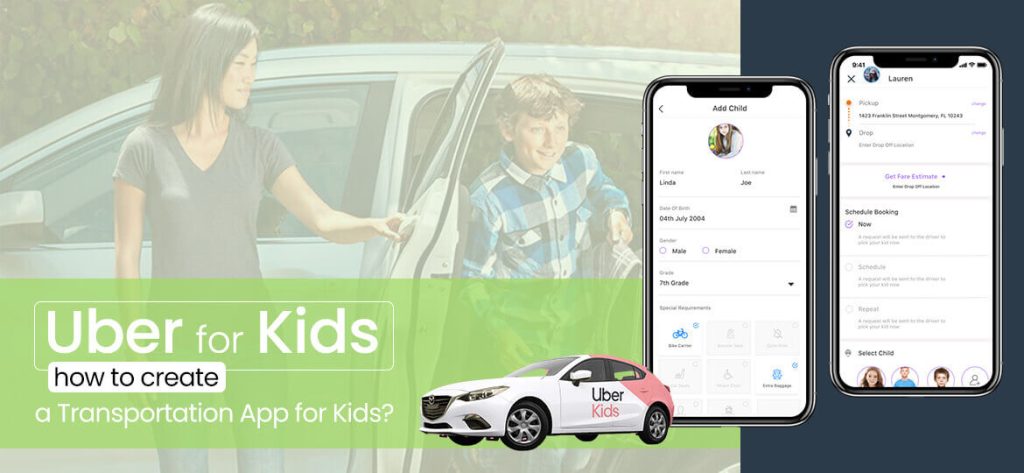
Parents do not choose a kids ride-hailing app on price — they choose it on trust, and every feature should reinforce that. On the parent side, the essentials are guardian sign-up with identity verification, the ability to schedule recurring rides (school runs, activities), live GPS tracking with an accurate ETA, driver profiles with photo and vehicle details, ride start and end notifications, and one-tap contact with support. On the child side, keep the interface minimal: a clear “I am in the car” confirmation, a visible SOS button, and automatic check-ins the parent can see. On the driver side, you need a vetted onboarding flow, trip navigation, rider details limited to what is necessary, and an incident-reporting path. Underpinning all of it is a safety layer: driver background checks, optional in-ride audio or video recording, ride-route monitoring that flags off-route deviations, and an emergency escalation flow that can reach a parent, an admin, and local contacts. Ratings and two-way feedback keep quality high over time. Build these deliberately rather than bolting them on, and the product earns the word-of-mouth that drives adoption. It is worth deciding early which features belong in the first release and which can wait: parents will forgive a missing loyalty program, but they will not forgive a driver whose identity they cannot confirm or a ride they cannot watch on a map. A useful rule is to ship every feature that answers the question “Is my child safe right now?” in the MVP, and defer everything that only improves convenience. Recurring scheduling, live tracking, verified drivers, notifications, and the SOS flow are non-negotiable from day one; in-app chat, referral rewards, and multi-child family accounts can follow once the core trust loop is proven. Accessibility matters too, since a parent may be booking on a phone while a grandparent monitors on a tablet, so the parent experience should work cleanly across devices and be simple enough for a non-technical guardian to use under stress. Designing the feature set around those moments, rather than around a competitor’s feature list, is what separates an app parents recommend from one they abandon.
Tech stack and integrations
An Uber for kids app is a real-time system, so the stack is chosen for reliability under live conditions rather than novelty. For the mobile apps we typically use Flutter or React Native for a shared, maintainable codebase across iOS and Android — our mobile app development team picks the framework based on your team and roadmap. The backend commonly runs on Node.js or Django with PostgreSQL for transactional data and Redis for session and location caching. Live tracking is handled through the Google Maps Platform (or Mapbox) for maps, routing, and ETAs, with WebSockets or Firebase pushing driver location to the parent in real time. Payments integrate through Stripe or a regional gateway; push and SMS notifications through Firebase Cloud Messaging and Twilio. The safety-critical integrations are what set this app apart: a background-check provider (such as Checkr) for driver vetting, an identity/biometric verification service for onboarding, and cloud storage for encrypted ride recordings. Everything sits behind role-based access control so a parent, driver, and administrator each see only what they should. If you already run engineering in-house, our IT staff augmentation model can drop specialists into your existing team instead.
How long does it take to build?
Timelines track scope, and for a safety-first app it pays to sequence carefully. A single-platform MVP — parent and driver apps, booking, live tracking, and basic verification in one city — is realistic in 3 to 5 months. A standard two-sided app across iOS and Android, with background checks, guardian approvals, payments, and ratings, generally takes 5 to 7 months. A full multi-city safety platform with biometric checks, ride recording, SOS escalation, and admin and school dashboards runs 6 to 9 months or more, since compliance testing and third-party integrations add real time. Those numbers assume a dedicated team working in two-week sprints with a working build in your hands from the first month. We front-load the risky pieces — verification, live tracking, and the emergency flow — so the parts that must never fail are proven early rather than rushed at the end. A phased launch, starting in one city and expanding once the safety model holds up, is almost always the faster route to a dependable product.
What drives the cost up or down
If you want to control budget, it helps to know which decisions move the number most. Verification and compliance are the biggest lever: background-check and identity APIs carry per-check fees and integration work, and requirements vary by region, so a stricter safety model costs more to build and to run. Number of user roles matters — every distinct app (parent, child, driver, school or admin) is a design, build, and test surface of its own. Real-time infrastructure for live tracking and instant notifications adds backend complexity and ongoing hosting cost. Ride recording and storage, if you include it, brings encryption, retention, and privacy obligations. On the other side, you can pull cost down by launching on one platform first, starting in a single city, using a cross-platform framework to share code, and deferring nice-to-haves like in-app chat or loyalty rewards to a later release. The disciplined path is to spend where trust is created and economize everywhere else. Our on-demand app development practice does exactly this kind of scoping to protect both safety and budget.
How does an Uber for kids app make money?
A kids ride-hailing service can earn from several streams, and most operators combine two or three. The most common is a commission or service fee on each ride, taken as a percentage of the fare the parent pays. A booking or safety fee per trip is easy for parents to accept when it is framed as paying for verification and monitoring. A subscription works well for the target audience: families with regular school and activity runs will pay a monthly plan for priority booking, discounted fares, or a set number of rides, which also smooths your revenue. Surge or scheduled-premium pricing can apply at peak times, though it should be handled gently for a family audience. Beyond fares, partnerships with schools, camps, and activity providers can bring bulk or sponsored rides, and a B2B tier lets institutions book and manage rides for groups. The right mix depends on your market and how price-sensitive your families are, and it is worth modeling before you build, because your pricing model affects the fare, wallet, and reporting features you will need. We help you choose a model that funds safe operations rather than one that undercuts them, and we build the billing and payout logic to support it. A sustainable business is one where the safety spend the product depends on is covered by the way it earns.
How EchoInnovate IT builds an Uber for kids app
EchoInnovate IT is an India-based custom and white-label software development company with 12 years in the field, a team of 50+, and 500+ products shipped — many of them launched under our clients’ own brands. We hold a 5.0 rating on Clutch across verified reviews. For an Uber for kids build we start with the safety model, not the screens: who is verified and how, what happens in an emergency, and what data is recorded and protected. From there a dedicated team — product, design, mobile, backend, and QA engineers — works in two-week sprints, putting a testable build in your hands early and often. We integrate the background-check, identity, maps, and payment providers that fit your region, and we build the parent, driver, and admin experiences as one coherent system. Because we work white-label, the app ships under your brand. Whether you want a full product team or a few specialists added to your own, our mobile app development and software development teams cover the whole build. The lowest-risk way to begin is our fixed-price pilot sprint, described below.

Start with a 2-week pilot sprint
Not sure how deep your safety and verification model needs to go, or what the full build will cost? Start with our $1,500 fixed-price 2-week pilot sprint. In two weeks a dedicated team scopes your Uber for kids app, validates the safety and tracking architecture, and delivers a working proof of concept plus a transparent quote for the full build — with no guesswork on price. It is the lowest-risk way to test the idea before you commit budget. Explore our mobile app development services, or book the pilot sprint and we will help you scope and start building this month.
See the service →Book a scoping call →Frequently asked questions
How much does it cost to build an Uber for kids app?
In 2026, a single-platform MVP sits at the most affordable end, a production two-sided iOS and Android app is a larger investment, and a full multi-city safety platform sits at the top end. The main variable is how many safety and verification layers you include. These are market ranges; we give a firm quote after a short scoping call.
What safety features are essential in a kids ride-hailing app?
At minimum you need background-checked drivers, guardian sign-up with identity verification, live GPS tracking, ride start and end notifications, a visible SOS button, and an emergency escalation flow. Many operators also add in-ride recording, off-route alerts, and two-way ratings. Safety is the core of the product, not an add-on.
How long does it take to develop an app like Uber for kids?
A focused MVP on one platform is realistic in 3 to 5 months. A standard two-sided app takes 5 to 7 months, and a full multi-city safety platform with biometric checks and dashboards runs 6 to 9 months or more. We front-load verification, tracking, and the emergency flow so the safety-critical pieces are proven early.
Which platform should I launch on first, iOS or Android?
Launch on the platform your first market uses most, then expand. Building with a cross-platform framework like Flutter or React Native lets you share most of the code across iOS and Android, so a second-platform launch is far cheaper than starting from scratch. We help you decide based on your target cities and audience.
Do you build the app under my brand?
Yes. EchoInnovate IT works white-label, so the parent, driver, and admin apps ship under your brand and in your app store accounts. We have shipped 500+ products, many launched under clients’ own brands, and we are happy to stay entirely behind the scenes.
Can you add drivers, schools, or fleet partners later?
Yes. We design the platform with role-based access from the start, so adding school dashboards, fleet partners, or new driver categories later is a configuration and feature effort rather than a rebuild. Starting in one city with a clean architecture is the fastest route to scaling safely.
Written by Kush P, Chief Technology Officer at EchoInnovate IT. Kush has led custom software and dedicated-team builds for 12 years, with 500+ products shipped — most of them under clients’ own brands.